
Nguyen Ngoc Han
ProfileProjectsActivityContact

Activity

Articles, ideas and updates from my projects.

Avatar Nguyen Ngoc Han
Nguyen Ngoc Han
12 October at 12:18·

PIHAUPA

PIHAUPA

Khai phá mẫu tiện ích trung bình trên dữ liệu giao dịch tăng dần.

Ứng dụng Java này triển khai PIHAUPA theo bài báo Intelligent average utility pattern analysis using pre-large concept in dynamic stream data (Kim et al., Journal of Big Data). Mục tiêu không chỉ là đưa ra tập mẫu HAUP cuối cùng: người dùng còn có thể theo dõi các phép tính, ngưỡng phân loại và quyết định Tight Re-Scan Condition sau từng batch.

Đầu vàoPhân tíchĐầu ra
Dữ liệu Tables 2–3 hoặc tệp TXT định lượng; Su và Sl do người dùng chọnPIHAUP-List, AUUB/MAU, LARGE/PRE-LARGE và cập nhật tăng dầnBáo cáo theo từng batch, số đo thời gian/heap, tệp TXT/CSV

Desktop, Web cục bộ và dòng lệnh dùng cùng lõi tính toán Java. Giao diện được thiết kế để đọc kết quả theo thứ tự: dữ liệu → công thức → quyết định re-scan → mẫu cuối → chi phí xử lý.

Đi tới: Bắt đầu nhanh · Cách đọc kết quả · Công thức · Dữ liệu lớn · Đối chứng · Kiến trúc

Bắt đầu nhanh

Yêu cầu JDK 17 trở lên. Chạy một trong các lệnh sau tại thư mục gốc dự án:

.\run-desktop.ps1  # Ứng dụng Desktop
.\run-web.ps1      # Web cục bộ; tự mở trình duyệt
.\run.ps1          # CLI với Tables 2–3, Su=0.23 và Sl=0.10

Desktop tự chạy ví dụ bài báo khi mở. Trên Web, chọn Dữ liệu bài báo hoặc một tệp .txt, điều chỉnh Su/Sl và bấm Chạy PIHAUPA. Không cần đóng gói EXE.

Phạm vi triển khai

Thành phầnChương trình thực hiện
Đọc dữ liệuNhận giao dịch định lượng theo batch; hỗ trợ tệp transactions.txt của các bộ thực nghiệm lớn.
Khai pháTính U, TU, MU, AU, AUUB, MRU, MRN, MAU; dựng PIHAUP-List, mở rộng DFS và cắt tỉa.
Cập nhậtDùng Su/Sl phân loại LARGE, PRE-LARGE, SMALL. Eq. (12) quyết định cập nhật pattern tree hiện có hay re-scan và dựng lại.
Giải thíchTrình bày Bước 1–5, số thế vào công thức, mẫu theo batch, sơ đồ re-scan và các mốc thời gian/heap quan sát.
Xuất kết quảTXT/CSV dễ đọc; CLI/Desktop có thể ghi thêm input chuẩn hóa và bảng chi tiết khi chọn thư mục xuất.

Công thức cốt lõi

Với u(i,T) = IU(i,T) * EU(i):

TU(T)   = sum u(i,T)
MU(T)   = max u(i,T)
U(P,T)  = sum u(i,T), i thuộc P và P thuộc T
AU(P,T) = U(P,T) / |P|
AU(P)   = sum AU(P,T) trên các T chứa P

LARGE:     AU(P) >= Su * TU(DB)
PRE-LARGE: Sl * TU(DB) <= AU(P) < Su * TU(DB)
SMALL:     AU(P) < Sl * TU(DB)

Tight re-scan Eq. (6):

MU(ID) >= ((Su - Sl) / (1 - TU(ID)/MU(ID) * Su)) * TU(OD)

Chương trình so sánh bằng dạng ổn định đại số của bài báo (Eq. 12), tránh phép chia:

MU(ID) - Su * TU(ID) >= (Su - Sl) * TU(OD)

OD là dữ liệu ở lần full scan gần nhất; ID là toàn bộ dữ liệu được thêm sau lần đó. Khi bằng ngưỡng (>=) vẫn re-scan.

Cách đọc kết quả

Khu vực WebCâu hỏi được trả lời
Tổng quanKết luận cuối là gì? Dữ liệu, ngưỡng và số mẫu nào tạo ra kết luận ấy?
Từng bướcTU, AU, cận trên và Eq. (12) được tính như thế nào ở DB0–DB2?
Sơ đồBatch mới dẫn tới update existing PT hay re-scan? Mẫu nào đổi trạng thái?
Kết quảNhững mẫu LARGE/HAUP và PRE-LARGE được quản lý có AU bao nhiêu?
Tài nguyênThời gian đọc tệp, thời gian thuật toán, CPU luồng và JVM heap thay đổi ra sao?
Dữ liệu lớnMột tệp transactions.txt chạy với ngưỡng đã chọn cho kết quả và log nào?
Thuật ngữKý hiệu trong bài báo có nghĩa gì và xuất hiện ở bước nào?

Sơ đồ re-scan cho chọn DB0/DB1/DB2, nhấn mạnh nhánh được thực hiện và mặc định hiển thị các mẫu đã thay đổi. Có thể mở phép tính AU hoặc tra cứu theo nhóm item. Sơ đồ tra cứu này được dựng từ báo cáo, không phải pattern tree nội bộ; nó chỉ vẽ tối đa 60 mẫu có AU cao nhất và ghi rõ tổng số mẫu.

Màu sắc là một lớp hỗ trợ đọc: xanh lam cho điều hướng và công thức; xanh lục cho LARGE hoặc nhánh không re-scan; hổ phách cho PRE-LARGE hoặc nhánh re-scan; đỏ cho lỗi. Nhãn chữ và số liệu luôn đi kèm màu, nên kết luận không phụ thuộc vào khả năng phân biệt màu sắc.

Giới hạn số đo: “thời gian thuật toán” không bao gồm đọc tệp hay dựng giao diện. Tổng thời gian phía server gồm nhận và xử lý request nhưng không gồm gửi response/dựng trang. Heap là bộ nhớ JVM được lấy mẫu, không phải RAM/RSS toàn máy; CPU luồng không phải phần trăm CPU hệ thống. Ứng dụng không đo điện năng tiêu thụ.

Trải nghiệm chờ kết quả: Skeleton Screen

Một báo cáo PIHAUPA có nhiều lớp thông tin: kết luận, phép tính theo batch, sơ đồ re-scan, danh sách mẫu và tài nguyên. Để người dùng không phải nhìn vào một trang trống trước khi phân tích, Web hiển thị skeleton mô phỏng vị trí các khối nội dung ấy. Mỗi tab có khung xem trước tương ứng; tab Dữ liệu lớn có khung riêng cho giao dịch, mẫu, thời gian và heap.

Khi bắt đầu chạy, nhãn ĐANG PHÂN TÍCH và hiệu ứng chuyển động nhẹ cho biết ứng dụng đang chờ kết quả. Sau khi nhận báo cáo, skeleton được thay bằng số liệu thật; nếu có lỗi, thông báo lỗi xuất hiện thay vì một kết quả giả. Hiệu ứng được tắt khi hệ điều hành yêu cầu giảm chuyển động. Skeleton là mẫu thiết kế giao diện, giúp định hướng và truyền đạt trạng thái; nó không tham gia tính AU, quyết định re-scan hay tăng tốc thuật toán.

Thực nghiệm với dữ liệu lớn

Trong tab Dữ liệu lớn, chọn thư mục Data đã giải nén hoặc chọn trực tiếp một hay nhiều tệp transactions.txt. Chương trình liệt kê từng bộ để chạy độc lập, không ghép sáu bộ vào cùng một database. Người dùng đặt Su/Sl cho từng lượt; 0,23/0,10 chỉ là giá trị khởi đầu, không phải ngưỡng cố định của dữ liệu lớn.

Quy tắc xử lýÝ nghĩa
items:TU:itemUtilitiesUtility từng item đã nằm trong tệp; chương trình dùng EU=1 và giữ giá trị utility trong IU, không nhân thêm lần nữa.
investment_table.txtMetadata của bộ dữ liệu, không bị dùng nhầm làm external utility; đọc transactions.txt không cần tệp này.
DB0 / DB1 / DB2Giữ thứ tự giao dịch gốc và chia khoảng 80% / 10% / 10% để mô phỏng chèn batch; ZIP gốc không định nghĩa các batch này.
Mỗi lượt chạyLưu ngưỡng, số giao dịch, HAUP/PRE-LARGE, số re-scan, thời gian và heap trong phiên.

Sau khi chạy, mở Từng bước hoặc Sơ đồ để xem phép tính DB0–DB2. Nếu max AUUB(item) < Su × TU(DB), cận trên chứng minh không có HAUP ở ngưỡng đó; điều này không thay cho báo cáo PRE-LARGE và thống kê re-scan. Web không đặt giới hạn tệp 20 MB cố định, nhưng quy mô xử lý thực tế vẫn phụ thuộc RAM/heap và độ phức tạp của dữ liệu.

Kiểm tra bộ dữ liệu gốc

Có thể kiểm tra toàn bộ ZIP hoặc chạy một bộ từ dòng lệnh:

.\run.ps1 --audit-archive "C:\Users\Mera\Downloads\Data-20261007T013338Z-1-001.zip"
.\run.ps1 --input "C:\Users\Mera\Downloads\Data-20261007T013338Z-1-001.zip" --dataset NewMushroom --summary
.\run.ps1 --input "C:\Users\Mera\Downloads\Data\NewChess-Metadata\transactions.txt" --su 0.12 --sl 0.05 --summary

Để lặp lại phép kiểm chứng với ZIP gốc (không tạo tệp dữ liệu mới):

.\run-tests.ps1
java -ea -Xmx3g -cp out piHAUPA.RealDatasetVerification "C:\Users\Mera\Downloads\Data-20261007T013338Z-1-001.zip"

Bài kiểm chứng đối chiếu số dòng, tổng TU và lỗi TU của cả sáu bộ; sau đó chạy NewMushroom với hai cặp ngưỡng 0,23/0,10 và 0,05/0,02. Ở ngưỡng thấp, phép kiểm chứng đọc lại giao dịch gốc trong ZIP để tính độc lập sumU và AU cho năm mẫu HAUP cuối. Phạm vi này không chứng minh mọi mẫu ở mọi ngưỡng.

Các lệnh CLI thường dùng

.\run.ps1 --input examples\paper-example.txt
.\run.ps1 --input examples\paper-example.txt --su 0.23 --sl 0.10 --output-dir results\paper
.\run.ps1 --help

Dòng đầu dùng ngưỡng ghi trong tệp; dòng thứ hai ghi đè ngưỡng và xuất báo cáo. Muốn chạy dữ liệu mặc định, dùng .\run.ps1 như phần Bắt đầu nhanh.

Định dạng dữ liệu đầu vào

Với tệp PIHAUPA thông thường, khai báo hai ngưỡng, bảng external utility và các batch theo thứ tự thời gian:

upper=0.23
lower=0.10

external:
A=2 B=5 C=1 D=3 E=6 F=4

batch DB0
T1: A:2 B:1 C:3
T2: C:1 D:2

batch DB1
T3: A:3 F:3

Giá trị sau item là internal utility; bảng external chứa external utility. Mỗi transaction cần mã duy nhất trên toàn bộ batch, không lặp item trong cùng giao dịch và có utility dương.

Đối chứng và kiểm thử

Kết quả chuẩn của ví dụ bài báo

BatchTU batchMU batchTU tích luỹTight re-scanLARGE/HAUP
DB014173141khởi tạoE=60, BE=45, B=35, AE=34
DB13224173không (24 < 26.438)E=72, BE=45
DB26740240có (ID tích luỹ DB1+DB2)E=84, B=75, BE=63.5

Sau DB1, AE=34 và B=35 chuyển thành PRE-LARGE; CAE=15.333 thành SMALL và bị loại khỏi pattern tree. DB2 làm điều kiện tight đạt, nên chương trình full scan và mở rộng mẫu lại.

Lưu ý: khi không re-scan, PIHAUPA chỉ cập nhật các ứng viên LARGE/PRE-LARGE đã có trong pattern tree. Do đó danh sách PRE-LARGE hiển thị là tập được quản lý, không nhất thiết chứa mọi tập thỏa bất đẳng thức lower/upper nếu tính lại vét cạn. Ví dụ F đạt ngưỡng PRE-LARGE ở DB1 nhưng không nằm trong cây từ DB0; điều kiện tight vẫn bảo đảm nó chưa thể thành LARGE trước lần re-scan kế tiếp.

Kiểm thử tự động

.\run-tests.ps1
java -ea -cp out piHAUPA.DesktopLayoutSmokeTest

Bộ test kiểm tra số liệu Tables 2-5, ranh giới phân loại, dấu >= của re-scan, tích luỹ ID qua nhiều batch, đối chiếu kết quả bằng vét cạn trên dữ liệu ngẫu nhiên nhỏ và dữ liệu input không hợp lệ. Bài smoke test desktop kiểm tra kích thước nút ở cột trái và hộp chọn thư mục xuất.

Bộ dữ liệu lớn có đáp án đối chiếu

examples/paper-scaled-9000.txt có 9.000 giao dịch: mỗi giao dịch trong Tables 2–3 được lặp 1.000 lần với TID duy nhất. File giữ nguyên Su=0.23, Sl=0.10. Vì vậy utility và các ngưỡng phải gấp đúng 1.000 lần ví dụ bài báo; cấu trúc mẫu và quyết định re-scan phải giữ nguyên.

BatchSố giao dịch tích luỹTU tích luỹUpperLowerSố LARGE
DB05.000141.00032.43014.1004
DB17.000173.00039.79017.3002
DB29.000240.00055.20024.0003

AU cuối: E=84.000, B=75.000, BE=63.500. Tight re-scan một lần ở DB2. Chạy bộ kiểm chứng độc lập theo định nghĩa AU(P) (vét cạn mọi tập con của A–F). Bộ test so khớp toàn bộ LARGE/HAUP và kiểm tra AU, phân loại của từng PRE-LARGE được quản lý:

.\verify-large.ps1

Tạo lại file với hệ số lặp khác, ví dụ 2.000 lần (18.000 giao dịch):

.\generate-paper-scaled.ps1 2000
.\verify-large.ps1 examples\paper-scaled-18000.txt

Xuất báo cáo và thao tác tệp

Trên Desktop, Chọn tệp dùng hộp chọn tệp của Windows; có thể kéo thả tệp .txt vào vùng dữ liệu. Thư mục xuất dùng hộp chọn thư mục của hệ điều hành. Với tệp lớn, màn hình chỉ mở sẵn 25 giao dịch đầu và có nút xem thêm; thuật toán vẫn tính trên toàn bộ tệp. Báo cáo cũ được ẩn trong lúc chạy lượt mới để tránh nhầm kết quả.

Tệp xuất từ Desktop/CLINội dung
BAO_CAO.txtBản đọc trước: công thức Bước 1–5, quyết định và kết quả theo batch.
bao-cao.csvSố liệu báo cáo ở dạng bảng.
patterns.csv, upper-bounds.csvChi tiết mẫu và cận trên.
performance-by-rows.csvSố đo chi tiết theo dòng.
pihaupa-input.txtDữ liệu đầu vào đã chuẩn hóa.

Web có nút tải TXT và CSV riêng, không xuất HTML hoặc ZIP. Giao diện hiện tại xuất từ báo cáo của lượt chạy đã lưu tạm trên server, không khai phá lại; nếu bản lưu hết hạn, hãy chạy phân tích rồi xuất lại.

Không phải dữ liệu giao dịch: PIPA_dataset/all_data.txt mô tả metadata ảnh (album, ảnh, bounding box, identity, subset), không chứa định nghĩa item, IU, EU hay batch cho PIHAUPA. Chương trình báo lỗi nếu chọn trực tiếp; muốn sử dụng phải định nghĩa cách chuyển đổi dữ liệu trước.

Kiến trúc và design pattern

Điểm quan trọng trong thiết kế là một lõi PIHAUPA phục vụ ba cách sử dụng: Desktop, Web và dòng lệnh. Nhờ vậy, khi thay đổi cách hiển thị hoặc xuất báo cáo, các công thức tính tiện ích và quyết định re-scan vẫn đi qua cùng một quy trình. Những cơ chế dưới đây giải quyết bài toán tổ chức và tương tác của phần mềm; chúng không thay thế thuật toán của bài báo.

Cơ chếCốt lõiVai trò trong chương trình
Observer / event listener của SwingNút phát sự kiện, listener phản ứngNối thao tác chọn tệp, chạy và xuất với handler tương ứng trong Desktop; bản thân listener không chạy thuật toán.
Template Method của SwingWorkerThư viện định sẵn vòng đời doInBackground() → done()Chạy phân tích/xuất file ngoài luồng giao diện rồi đưa kết quả về EDT, giúp cửa sổ không bị đứng.
Facade (vai trò kiến trúc)Một cửa vào che trình tự nhiều bướcAnalysisReport.run gom xử lý batch và đo đạc; ExportBundle.writeDirectory gom các file TXT/CSV từ kết quả đã tính. Desktop, Web, CLI dùng chung lõi.
Static factory của SwingPhương thức BorderFactory.create... tạo viềnDựng giao diện nhất quán; đây là API có sẵn, không phải Factory Method do dự án tự cài đặt.
Skeleton Screen (UI pattern)Hiện khung có hình dạng gần kết quả trước khi số liệu sẵn sàngWeb giữ bố cục dễ nhận biết khi chưa chạy/đang chạy; thay khung bằng báo cáo thật sau khi phân tích. Không tham gia tính AU hoặc re-scan.

Trong phần trình bày kiến trúc, cần phân biệt cơ chế được sử dụng với pattern do dự án tự triển khai: SwingWorker và BorderFactory là API của Swing; AnalysisReport.run và ExportBundle.writeDirectory đảm nhiệm vai trò Facade. RescanPolicy hiện là enum được kiểm tra bằng nhánh điều kiện, chưa phải GoF Strategy. PIHAUP-List, pattern tree, MAU pruning và Tight re-scan là thuật toán/cấu trúc dữ liệu của bài báo, không phải design pattern GoF. Tài liệu kiến trúc và design pattern trình bày chi tiết cách từng cơ chế hoạt động, nơi áp dụng và giới hạn của nó.
↗ https://github.com/Ericismee/PIHAUPA
Avatar Nguyen Ngoc Han
Nguyen Ngoc Han
12 October at 01:02·

portfolio

Eric Profile

A personal profile and publishing website built with Next.js, React, strict TypeScript and Node.js. It combines a familiar professional profile layout with a private administration area for managing content without editing code.

Production: ericisme.cloud . PostgreSQL and private Blob storage are provisioned and the local data has been migrated. DNS is managed at iNET; www redirects to the main domain.

Local website: localhost:3001

Features

  • Public profile with avatar, cover, introduction, social links and an optional downloadable PDF CV.
  • Projects with images, technologies, descriptions, individual contribution fields, source/demo links and featured pinning.
  • Posts with text, an image, a link, drafts, publishing and editable display time. Future posts remain private until their scheduled time.
  • Experience, education, certifications and custom profile sections with editable entries.
  • Search, project filters, grid/list presentation, reorder controls and individual visibility settings.
  • Authenticated administration with server-side authorization, CSRF checks and HttpOnly session cookies.
  • Password visibility controls and private account settings for username, account email and password. Changes require the current password and rotate all sessions; account email is separate from public contact information and is not a password recovery service.
  • Persistent SQLite and disk uploads locally, or PostgreSQL and private Vercel Blob storage in the cloud. Cloud data survives redeployments.
  • Deleted entries can be restored from trash as drafts. The last 30 document revisions are available for full recovery.
  • Contact form that saves real messages to the private administration inbox.
  • Public eye-icon visit counter and private traffic dashboard with historical profile/page/session counts, encrypted IP addresses and browser/device details retained indefinitely without automatic deletion. Administrator sessions are excluded.
  • English by default with a remembered Vietnamese/English interface choice, light/dark themes, readable accent colors, density and standard/wide layout settings.
  • Explicit import of the previous browser mock or a JSON export, including embedded image/PDF migration.

GitHub links open the actual account and repositories. Public GitHub summaries, contribution history and language rankings use upstream data with explicit unavailable/stale states. An authenticated administrator can separately connect GitHub to import accessible public and private repositories; private repository discovery is never exposed by the public summary. Owner-authored descriptions and custom titles remain in their original language when switching the interface language.

Screenshots

Screenshots are captured from the local production build using an isolated QA database. Example management entries shown there are test content.

Stack

  • Next.js App Router with server-rendered public pages and Node.js Route Handlers.
  • React components and reusable typed administration forms.
  • TypeScript in strict mode; Zod supplies validation and inferred domain types.
  • Node.js 24 and its built-in SQLite driver.
  • CSS design tokens, local Plus Jakarta Sans and JetBrains Mono fonts.
  • ESLint, Prettier, Node's test runner and a browser QA script.

Local deployments use SQLite on persistent disk. Vercel deployments use the PostgreSQL adapter and private Vercel Blob storage; Vercel refuses to start without DATABASE_URL instead of silently writing to ephemeral disk.

See Vercel deployment and recovery. After migration, production is the authoritative data copy; local SQLite edits do not automatically sync to production.

Local setup

Install Node.js 24, then run:

npm ci
npm run admin:create -- eric
npm run dev

After signing in, return to the profile to edit in place. Small pencil buttons edit the adjacent section; camera buttons edit the avatar and cover. The navbar's … → Settings → Profile sections menu lets the administrator fill empty sections, edit hidden sections or add custom sections, without displaying placeholder cards to visitors. Section settings change the title, visibility and order. Changes save to the same database as the dashboard. Visitors see only published content and no editing controls or administration links. Appearance settings and sign out are also in the navbar … menu. Sign out there to return to visitor mode.

Image uploads include a framing preview: drag with a mouse or touch, use arrow keys to reposition (Shift for larger steps), and use the zoom slider. Avatar previews include a circular guide; covers use a 4:1 frame. Choose Use this framing, then Save to publish. Until framing is applied or cancelled, saving the form is disabled. Cancel keeps the saved image. Applied crops are exported as JPEG (800×800 avatars; 1600×400 covers); GIF uploads become still images. Reframing an existing image uses the saved crop, so choose the original file again to recover areas outside that crop.

Environment

Copy .env.example to .env when configuration is needed. Keep .env and real passwords out of Git.

PUBLIC_ORIGIN=http://localhost:3001
DATA_DIR=.data
  • PUBLIC_ORIGIN: exact browser origin without a trailing slash. Required for production writes. Use the actual HTTPS website origin when deployed.
  • DATA_DIR: persistent location for profile.sqlite, its WAL files and the uploads directory. Default: .data.
  • PORT: standalone server port; defaults to 3001.
  • HOST: standalone binding; defaults to 127.0.0.1. Docker sets its generated server to 0.0.0.0.
  • ADMIN_PASSWORD: used only by the administrator setup command; never a browser-visible variable.
  • NEXT_TELEMETRY_DISABLED=1: optional build/runtime telemetry setting.

Next.js loads local environment files in development. npm start loads .env before starting the standalone production server. Administrator CLI commands inherit DATA_DIR from the shell; if you use a custom location, supply that same value when creating the account.

Hiding a profile section affects its placement on the profile page; published projects and posts retain their dedicated pages. Hide or unpublish an individual entry to remove it from all public content.

Open an existing mock at the same browser origin and choose Import previous demo to migrate its eric-profile-mock localStorage data. For data from a different origin, import the exported JSON file instead. Import replaces the saved document after confirmation, retaining a recovery revision. JSON imports, PNG/JPEG/WebP/GIF images and PDF CV uploads support files up to 20 MB. Client and server both enforce the upload limit. Private repositories and unpublished content use a distinct amber palette in light and dark themes.

Checks and production build

npm run format
npm run format:check
npm run lint
npm run typecheck
npm test
npm run build
npm start

npm run check runs lint, type checking and automated API/domain tests. npm start serves the standalone build and keeps the data directory outside .next.

The API tests use temporary databases. Browser QA uses a separate production preview on port 3002 and .qa-next-data; it must never point at production. See validation details.

Deployment

A Docker configuration is included for a single Node.js instance behind an HTTPS reverse proxy:

# Set PUBLIC_ORIGIN in the host environment or a private .env file.
docker compose up -d --build
# Create your account inside the persistent application environment.
docker compose exec profile node scripts/create-admin.ts eric

The container exposes port 3001 to loopback on the host. Configure your reverse proxy and HTTPS certificate for the selected domain, forwarding requests to 127.0.0.1:3001. The profile-data named volume persists data between container rebuilds. Do not delete that volume when upgrading.

For a normal Node server, keep DATA_DIR outside release directories and use npm ci, npm run build, then npm start under your process manager. Restart the process after deploying the new build. On Windows, stop a running standalone server before rebuilding because it locks the build directory.

A real deployment still needs a host, a domain or provider URL, HTTPS, persistent storage and access to that environment. No production deployment or Docker execution has been verified in this workspace.

Backup and recovery

For a complete backup, stop the application and copy the entire DATA_DIR, including the database and uploaded files. Keep backups private: they include drafts, messages, administrator password hashes and sessions. Restore the directory while the application is stopped.

JSON exports contain content and appearance settings, including drafts. They do not include uploaded files, accounts or inbox messages. Revision history is a convenience for content recovery, not a replacement for an off-host backup.

Structure and conventions

app/          Next.js pages, route handlers and application styles
components/   Public UI, administration, forms, language context and icons
lib/          Zod schemas, persistence, authentication, API and typed helpers
scripts/      Account setup, standalone startup and optional browser QA
tests/        Isolated authorization, content, upload and persistence tests
src/          Retained design assets, fonts and legacy mock reference modules
.data/        Private runtime data — ignored by Git

The active application code is in app, components and lib. The earlier buildless prototype and Node server remain for reference; npm application scripts run Next.js. See ARCHITECTURE.md for responsibilities, formatting rules, comments and migration requirements.

Public project summaries are based on the owner-provided GitHub repositories. CONTENT-SOURCES.md records sources and limits; personal roles or measured outcomes have not been invented.

GitHub profile and technology sidebar

The profile connects to the configured public GitHub account automatically, without OAuth or a token. A compact card shows repository/star/follower counts and ten language chips with an expand-to-all control and local technology logos. Explore GitHub opens the public bio, location/company, join date, following/fork counts and searchable repositories with descriptions, topics, primary languages, stars, forks, archive/fork flags and update dates. Search matches names, languages and topics. The card remains accessible on mobile even though other sidebar cards are hidden.

Languages are ranked by summed source-code bytes from GitHub’s repository languages endpoint, excluding forks and empty repositories. This describes code distribution, not proficiency or framework knowledge. Repository and profile data use the public repository list and user profile endpoints. Existing site content and uploaded pictures are not overwritten by GitHub data.

The server paginates repositories, up to ten pages of 100, and requests languages four repositories at a time under a twelve-second deadline. A timeout, API limit, failed page or truncation is labelled as partial or unavailable. Private repositories, private account details and OAuth are outside this public integration. No full-account export is claimed.

Responses are cached in memory and under DATA_DIR/github-cache for one hour; unavailable responses expire after five minutes. No background worker is required: the next page request after expiry refreshes the data. Interface language, administrator section management, appearance settings and sign out remain in the navbar’s three-dot Settings menu.

GitHub profile, contributions and activity

/github presents GitHub identity, the full detected technology stack, repository counts, featured repositories and tabs for all public repositories and activity. Search matches names/descriptions/languages/topics; sorting supports updates, stars and name. Logos are served locally from Devicon v2.17.0 and Simple Icons v15.18.0; source and licenses are in public/tech.

The yearly calendar reads GitHub’s public contribution HTML and extracts exact per-day counts, independent of the recent event stream. It includes contribution types beyond commits. Years are selectable; future dates remain blank. The parser requires every elapsed day of the selected year and fails closed on upstream markup changes. Calendar cells support pointer selection and arrow-key navigation. On narrow screens only the calendar itself scrolls horizontally.

The timeline loads up to 30 owner-authored commits on default branches from the six most recently updated, non-fork, non-archived public repositories. It is a recent sample, not a full-account commit export. Public events use the latest 100 events returned by GitHub’s Events API, whose retention and delivery latency are controlled by GitHub. Commit data uses the commits endpoint. No event counts are substituted for calendar contributions.

While visible, the page checks automatically, by default every hour (configurable to 5, 15, 30 or 60 minutes), and supports manual refresh. It pauses checks in hidden tabs and cancels in-flight requests when unmounted or changing years. Events use ETags and respect X-Poll-Interval; polling slows when the public API quota is low. Commits cache for five minutes, calendars for fifteen minutes, profile/technologies for one hour. Refresh checks these caches rather than bypassing GitHub’s limits. Snapshots persist under DATA_DIR/github-cache; failed updates retain labelled stale snapshots instead of fabricated zero counts. A manual refresh does not guarantee instant upstream delivery.

Admins can connect a GitHub account using a personal access token in Admin → GitHub → Connect GitHub account, or directly in a project/post import form. The connected account supplies the authenticated API budget and can import authorized private repositories into admin-only previews. Public feeds still exclude private repositories; applying an import never saves or publishes automatically. See connection and credential storage instructions. This is token-based authentication, not OAuth. The authenticated path is covered with mocked responses; no real owner token was entered during validation.

Alternatively configure GITHUB_TOKEN on the server. It is sent only to api.github.com, never returned to the browser or sent to the public calendar source. A UI connection takes precedence; disconnecting returns to the environment token if configured. Do not use a NEXT_PUBLIC_ prefix.

Administrator GitHub settings

After signing in, open Settings (⋯) → GitHub settings, the inline settings button on /github, or the GitHub tab in /admin. The same form manages the public account, page title/description, refresh interval and visibility of the sidebar, overview statistics, technologies, calendar, featured repositories, repository tab, commits and events.

Load repositories before saving a different username. Changing accounts clears the previous hidden/featured selections; Reset restores the unsaved form. Account lookup is authenticated, validated and limited to public GitHub data. Repository choices are saved with the existing version check, session and CSRF protections, and remain after restarting the server. The inline form protects unsaved changes on close.

Repositories can be hidden individually; forks can be excluded as a group. Featured repositories can be selected manually (up to twelve) and ordered with the move buttons. An empty manual selection stays empty. Newly discovered repositories are visible by default; newly discovered repositories are not automatically pinned in manual mode. This changes presentation on this website only.

Public server rendering and refresh responses filter hidden repositories and their owner-account commit/event records. The private repository list remains available only to administrators. Account-wide contribution and language totals are intentionally not recalculated when a repository is hidden. The recent commit source remains a bounded six-repository sample; hiding a source repository does not expand that sample. The public account and repositories remain accessible on GitHub itself.

The configured cadence applies while /github is visible. It is a browser-driven refresh, not an hourly background job when the site is closed. Upstream cache expiry, quota and polling limits still apply. Manual refresh checks the same caches. The compact profile card uses server-loaded data and updates on page reload/navigation.

Shared editing and audit

Markdown posts and project details use the same keyboard-accessible Edit / Preview tabs in both inline editing and administration. Markdown mode can open a local .md file directly into preview. Plain project details retain line breaks; imported READMEs render headings, lists, tables, links and code. File inputs support 20 MiB; Markdown content retains the existing 30,000-character limit and rejects a longer file without replacing the form.

Skills have their own searchable add/edit/hide/delete list. Sections expose their own entry lists and configuration, including hide/show and removal. Project/post/custom-entry deletion uses shared recoverable trash; section and skill changes can also be recovered from document revisions. The server rejects newly introduced duplicate project names/repositories, section names (including built-in English/Vietnamese aliases), skills, identical posts and custom-entry identities. Existing duplicates may be edited or reduced. Different posts about the same repository remain supported.

Use npm run dev or npm start. The obsolete root server.mjs fails closed; it is not a supported deployment entrypoint. The old administrator .mjs command delegates to the current TypeScript implementation. Login/contact limits persist in SQLite across API reloads and restarts.

See the 11 October 2026 functional and security audit for evidence, scope and deployment limitations.

↗ https://ericisme.cloud
Avatar Nguyen Ngoc Han
Nguyen Ngoc Han
11 October at 12:27·

NotebookE

A private AI research and media workspace that runs on your PC

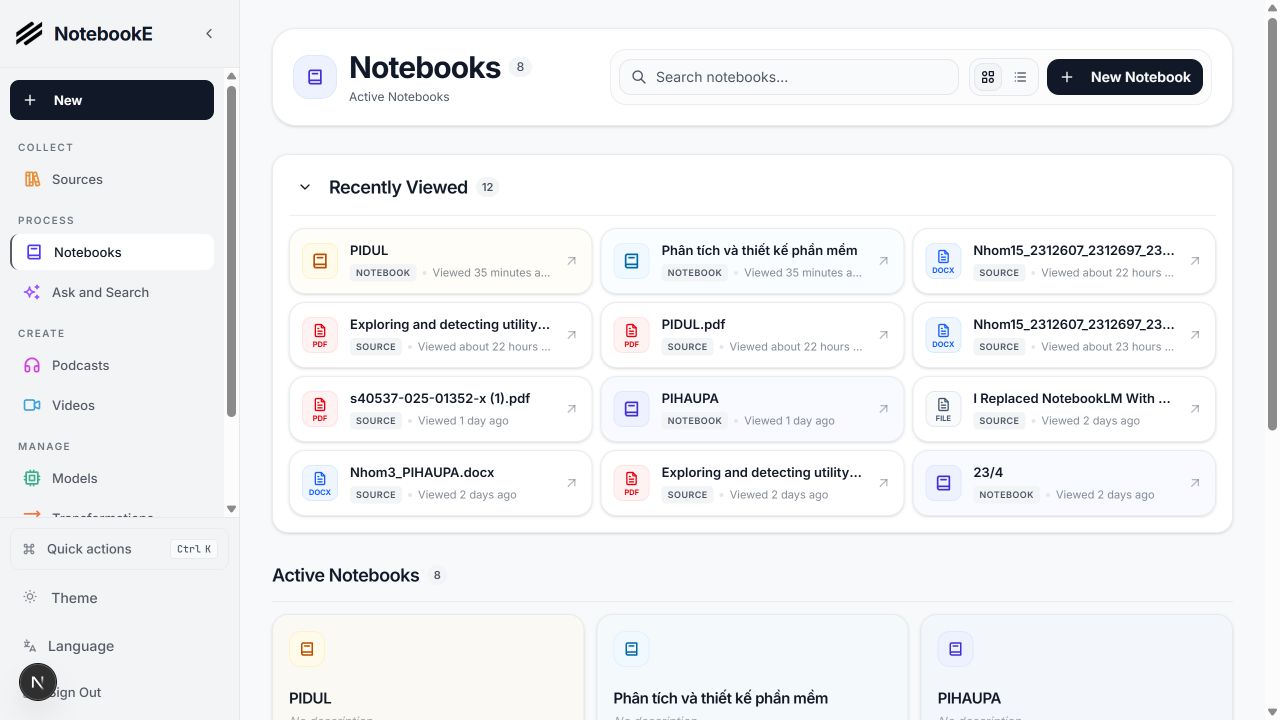
NotebookE notebook library

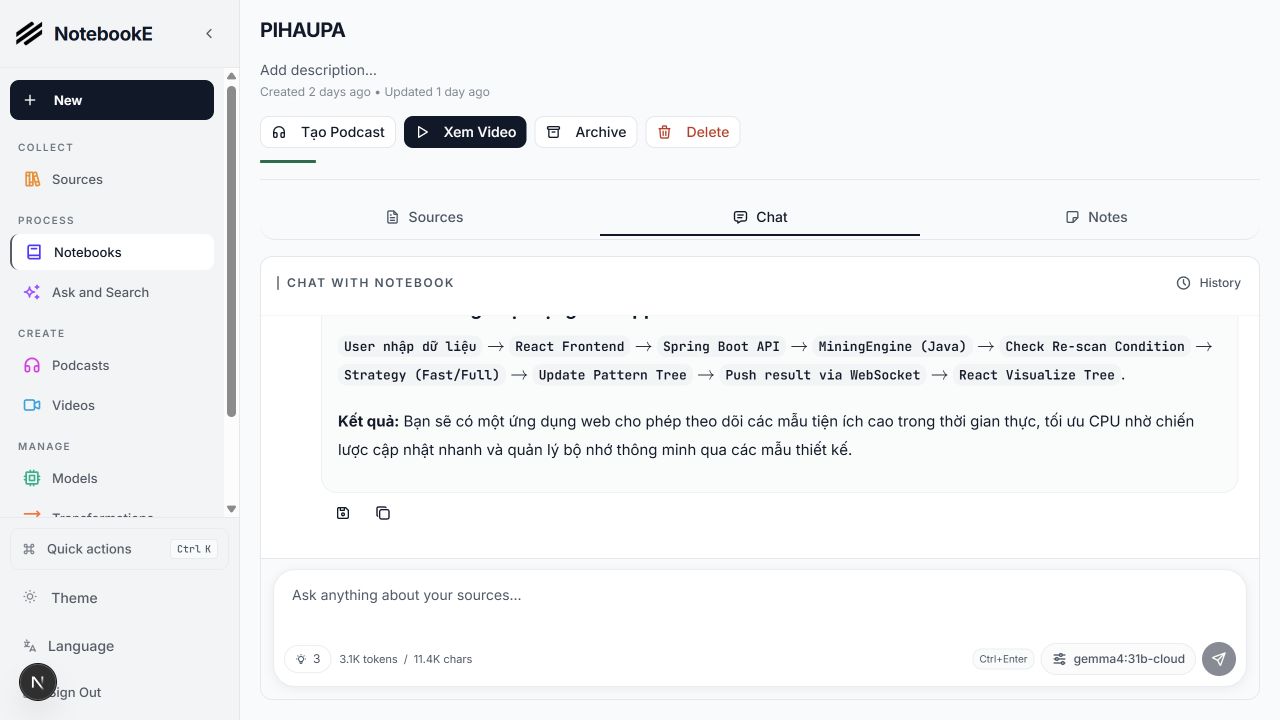
NotebookE turns your documents, links, audio, and video into a searchable knowledge base. Ask questions with source context, organize research in notebooks, and create narrated podcasts or videos from the same material.

The system supports local AI through Ollama and OpenAI-compatible servers alongside cloud providers. Your frontend, API, database, background worker, Edge TTS narration, and video workflow can all run on your own computer.

NotebookE empowers you to:

  • 🔒 Control your data - Keep your research private and secure
  • 🤖 Use local or cloud AI - Connect Ollama, LM Studio, OpenAI-compatible endpoints, Google, OpenAI, Anthropic, and more
  • 📚 Organize multi-modal content - PDFs, videos, audio, web pages, and more
  • 🎙️ Generate multi-speaker podcasts - Reusable episode profiles, Eric and Luna presenters, live progress, outline tracking, and downloadable audio
  • 🎬 Create videos on your PC - Build scripts, scenes, captions, visuals, narration, and final video from notebook content
  • 🗣️ Use Edge TTS narration - Vietnamese voices with improved English technical pronunciation for podcasts and videos
  • 🔍 Search intelligently - Full-text and vector search across all your content
  • 💬 Chat with context - Stream answers from selected models, keep conversation history, and stop generation at any time
  • ⚡ See updates without refreshing - Podcast and video jobs update in real time while background workers process them
  • 🌐 Use a multilingual UI - Vietnamese, English, and other supported interface languages

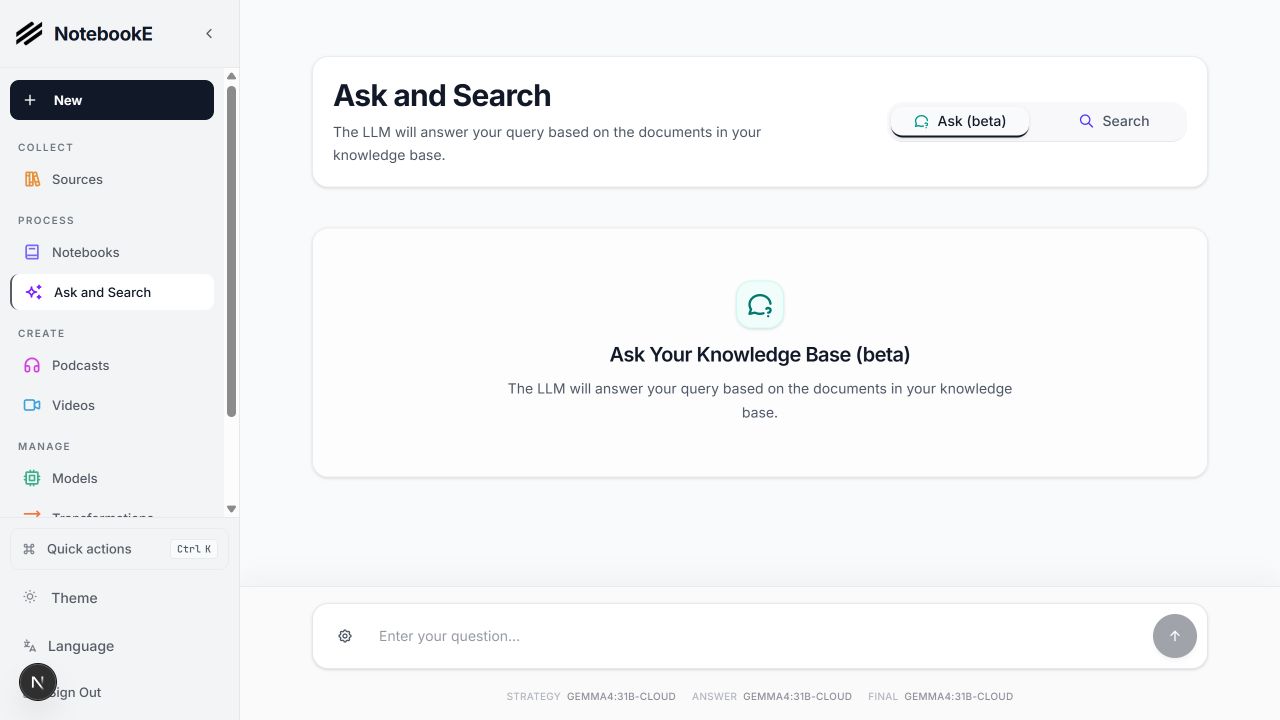
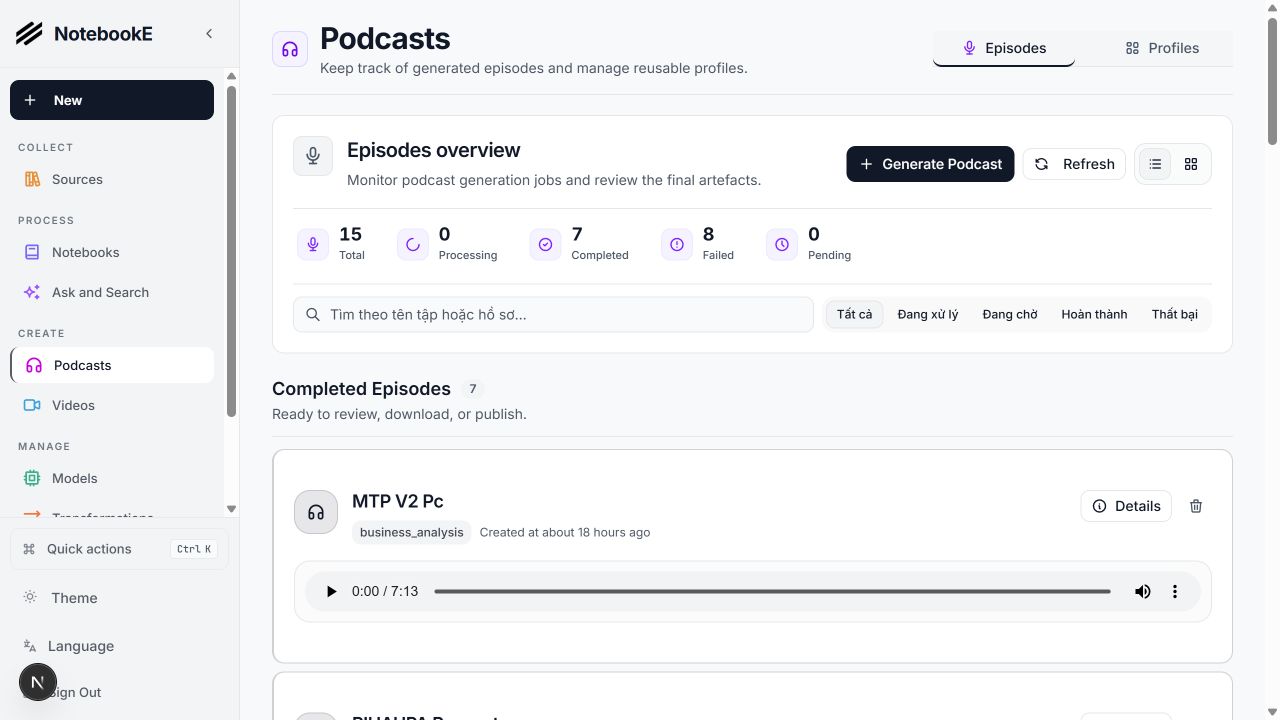
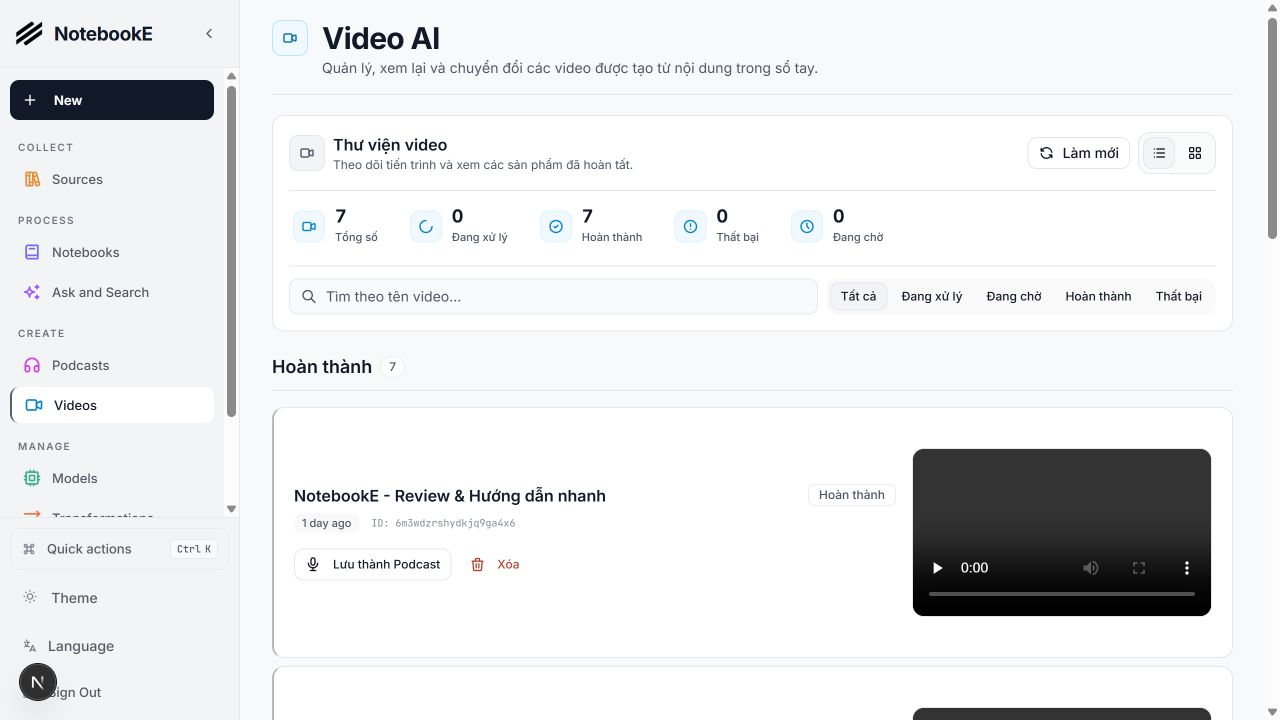
See NotebookE in action

Notebook workspaceAsk and Search
Chat with a NotebookE notebookAsk and Search across the knowledge base
Podcast productionVideo production
Podcast generation and episode managementLocal AI video generation and management

How the system works

Next.js web app :3000
        ↓
FastAPI service :5055
        ↓
SurrealDB :8000  +  background command worker
        ↓
Local/cloud LLMs  ·  Edge TTS  ·  Podcast pipeline  ·  Video pipeline

🆚 NotebookE vs Google Notebook LM

FeatureNotebookEGoogle Notebook LMAdvantage
Privacy & ControlSelf-hosted, your dataGoogle cloud onlyComplete data sovereignty
AI Provider ChoiceLocal and cloud models, including Ollama and OpenAI-compatible APIsGoogle models onlyFlexibility and local processing
Podcast Speakers1-4 speakers with custom profiles2 speakers onlyExtreme flexibility
Video GenerationScript, scenes, visuals, captions, Edge TTS, and final renderingLimitedA complete research-to-video workflow on your PC
Content TransformationsCustom and built-inLimited optionsUnlimited processing power
API AccessFull REST APINo APIComplete automation
DeploymentDocker, cloud, or localGoogle hosted onlyDeploy anywhere
CitationsBasic references (will improve)Comprehensive with sourcesResearch integrity
CustomizationOpen source, fully customizableClosed systemUnlimited extensibility
CostPay only for AI usageFree tier + Monthly subscriptionTransparent and controllable

Why Choose NotebookE?

  • 🔒 Privacy First: Your sensitive research stays completely private
  • 💰 Cost Control: Choose a cloud provider or run compatible models locally
  • 🎙️ Podcast and Video Creation: Reuse your notebook context to produce scripts, speech, and rendered media
  • 🔧 Unlimited Customization: Modify, extend, and integrate as needed
  • 🌐 No Vendor Lock-in: Switch providers, deploy anywhere, own your data

Built With

Python Next.js React SurrealDB LangChain

🚀 Quick Start

Prerequisites

  • Python 3.11+
  • Node.js 20+
  • Docker Desktop for SurrealDB
  • FFmpeg for Podcast and Video rendering
  • An AI provider, or a local model server such as Ollama or LM Studio

Step 1: Clone and install

git clone https://github.com/Meranh05/NotebookE.git
cd NotebookE
uv sync
cd frontend && npm install && cd ..

Step 2: Configure the environment

Copy .env.example to .env, set OPEN_NOTEBOOK_ENCRYPTION_KEY, and configure any provider credentials you need. Provider models can also be added later from Models in the web interface.

Step 3: Start NotebookE

Start each service in dependency order:

make database
make api
make worker-start
make frontend

Or start the complete local stack:

make start-all

Open http://localhost:3000. The API runs at http://localhost:5055 and SurrealDB at http://localhost:8000.

The background worker is required for source processing, embeddings, Podcasts, and Videos. Jobs remain queued if the worker is not running.

Docker deployment

For a container-based installation, download the project compose file:

curl -o docker-compose.yml https://raw.githubusercontent.com/Meranh05/NotebookE/main/docker-compose.yml

Set OPEN_NOTEBOOK_ENCRYPTION_KEY in .env, then start the containers:

docker compose up -d

Use docker compose logs -f to follow startup and migration progress. See the installation guide for local AI, storage, and production deployment options.

Configure an AI provider

  1. Go to Models and choose your provider (OpenAI, Anthropic, Google, etc.)
  2. Click + Add Configuration
  3. Paste your API key and other info as needed and click Add Configuration
  4. Click Test to test connection
  5. Click Sync Models and check models to include
  6. Assign the chat, transformation, embedding, and optional media models you want to use

Done! You're ready to create your first notebook.

Need an API key? Get one from: OpenAI · Anthropic · Google · Groq (free tier)

Want free local AI? See examples/docker-compose-ollama.yml for Ollama setup


📚 More Installation Options

  • With Ollama (Free Local AI) - Run models locally without API costs
  • From Source (Developers) - For development and contributions
  • Complete Installation Guide - All deployment scenarios

📖 Need Help?

  • 🤖 AI Installation Assistant: CustomGPT to help you install
  • 🆘 Troubleshooting: 5-minute troubleshooting guide
  • 💬 Community Support: Discord Server
  • 🐛 Report Issues: GitHub Issues

Provider Support Matrix

Thanks to the Esperanto library, we support this providers out of the box!

ProviderLLM SupportEmbedding SupportSpeech-to-TextText-to-Speech
OpenAI✅✅✅✅
Anthropic✅❌❌❌
Groq✅❌✅❌
Google (GenAI)✅✅✅✅
Vertex AI✅✅❌✅
Ollama✅✅❌❌
oMLX✅✅❌❌
Perplexity✅❌❌❌
ElevenLabs❌❌✅✅
Deepgram❌❌✅✅
Azure OpenAI✅✅✅✅
Mistral✅✅✅✅
DeepSeek✅❌❌❌
Cohere✅✅❌❌
Voyage❌✅❌❌
xAI✅❌❌✅
OpenRouter✅✅✅✅
DashScope (Qwen)✅❌❌❌
MiniMax✅❌❌❌
Novita✅❌❌❌
PayPerQ (PPQ)✅✅✅✅
OpenAI Compatible*✅✅✅✅

*Supports LM Studio and any OpenAI-compatible endpoint. Prefer the native oMLX provider for oMLX (Apple Silicon); see docs/5-CONFIGURATION/omlx.md.

✨ Key Features

Core Capabilities

  • 🔒 Privacy-First: Your data stays under your control - no cloud dependencies
  • 🎯 Multi-Notebook Organization: Manage multiple research projects seamlessly
  • 📚 Universal Content Support: PDFs, videos, audio, web pages, Office docs, and more
  • 🤖 Multi-Model AI Support: 18+ providers including OpenAI, Anthropic, Ollama, Google, LM Studio, and more
  • 🎙️ Professional Podcast Generation: Advanced multi-speaker podcasts with Episode Profiles
  • 🎬 Local Video Production: Generate structured scenes, captions, visuals, Edge TTS narration, and rendered videos
  • 🔍 Intelligent Search: Full-text and vector search across all your content
  • 💬 Context-Aware Chat: AI conversations powered by your research materials
  • 📝 AI-Assisted Notes: Generate insights or write notes manually
  • ⚡ Live Job Updates: Follow Podcast and Video generation without reloading the page

Advanced Features

  • ⚡ Reasoning Model Support: Full support for thinking models like DeepSeek-R1 and Qwen3
  • 🔧 Content Transformations: Powerful customizable actions to summarize and extract insights
  • 🌐 Comprehensive REST API: Full programmatic access for custom integrations API Docs
  • 🔐 Optional Password Protection: Secure public deployments with authentication
  • 📊 Fine-Grained Context Control: Choose exactly what to share with AI models
  • 📎 Citations: Get answers with proper source citations

Podcast and Video Creation

NotebookE uses the same notebook context for both media workflows. Podcast generation supports reusable speaker and episode profiles, while Video generation turns research into planned scenes with synchronized narration and captions. Both workflows run as background jobs and update the interface as progress changes.

NotebookE local video workspace

📚 Documentation

Getting Started

  • 📖 Introduction - Learn what NotebookE offers
  • ⚡ Quick Start with OpenAI - Get up and running in 5 minutes
  • 🔧 Installation - Comprehensive setup guide
  • 🎯 Run It Fully Local - Ollama/LM Studio, completely private

User Guide

  • 📱 Interface Overview - Understanding the layout
  • 📚 Notebooks, Sources & Notes - Organizing your research
  • 📄 Adding Sources - Managing content types
  • 📝 Working with Notes - Creating and managing notes
  • 💬 Chatting Effectively - AI conversations
  • 🔍 Search - Finding information

Advanced Topics

  • 🎙️ Podcast Generation - Create professional podcasts
  • 🔧 Content Transformations - Customize content processing
  • 🤖 AI Models - AI model configuration
  • 🔌 MCP Integration - Connect with Claude Desktop, VS Code and other MCP clients
  • 🔧 REST API Reference - Complete API documentation
  • 🔐 Security - Password protection and privacy
  • 🚀 Deployment - Complete deployment guides for all scenarios
  • 🧭 Vision & Principles - What NotebookE is, and where it's going
  • 🛠️ Developer Docs - Architecture, setup, contributing, decision records

🗺️ Roadmap

Upcoming Features

  • Cross-Notebook Sources: Reuse research materials across projects
  • Bookmark Integration: Connect with your favorite bookmarking apps
  • More Video Templates: Expand reusable landscape and vertical storytelling styles
  • Richer Citations: Improve source-level evidence in chat, search, and generated media

Recently Completed ✅

  • Next.js Frontend: Modern React-based frontend with improved performance
  • Comprehensive REST API: Full programmatic access to all functionality
  • Multi-Model Support: 18+ AI providers including OpenAI, Anthropic, Ollama, LM Studio
  • Advanced Podcast Generator: Professional multi-speaker podcasts with Episode Profiles
  • Local Video Workflow: Script planning, visual generation, captions, Edge TTS, and rendering
  • Live Front-End Updates: Podcast and Video progress refreshes without a full page reload
  • Async Processing: Background workers keep long-running AI and media tasks responsive
  • Content Transformations: Powerful customizable actions for content processing
  • Enhanced Citations: Improved layout and finer control for source citations
  • Multiple Chat Sessions: Manage different conversations within notebooks

📖 Need Help?

  • 🤖 AI Installation Assistant: We have a CustomGPT built to help you install NotebookE - it will guide you through each step!
  • New to NotebookE? Start with our Getting Started Guide
  • Need installation help? Check our Installation Guide
  • Want to see it in action? Try our Quick Start Tutorial

🤝 Community & Contributing

Join the Community

  • 💬 Discord Server - Get help, share ideas, and connect with other users
  • 💡 GitHub Discussions - Ask questions and shape features, product direction, design, and architecture
  • 🐛 GitHub Issues - Report reproducible bugs and find approved work
  • ⭐ Star this repo - Show your support and help others discover NotebookE

Contributing

We welcome contributions! We're especially looking for help with:

  • Frontend Development: Help improve our modern Next.js/React UI
  • Testing & Bug Fixes: Make NotebookE more robust
  • Feature Development: Build the coolest research tool together
  • Documentation: Improve guides and tutorials

Current Tech Stack: Python, FastAPI, Next.js, React, SurrealDB Future Roadmap: Real-time updates, enhanced async processing

See our Contributing Guide for detailed information on how to get started, including our guidelines for AI-assisted contributions. To understand what we're building (and what we'll say no to), read VISION.md.

📄 License

NotebookE is MIT licensed. See the LICENSE file for details.

↗ https://github.com/Ericismee/NotebookE
Avatar Nguyen Ngoc Han
Nguyen Ngoc Han
11 October at 12:10·

EriHub

EriHub — Digital Products & Software License E-Commerce Platform

Nền tảng thương mại điện tử chuyên biệt phân phối sản phẩm số, key bản quyền phần mềm, tài khoản dịch vụ với cơ chế xác thực thanh toán tự động (VietQR / SePay / MoMo) và bàn giao tức thì.


⚡ Tech Stack

  • Framework: Next.js 16 (App Router) + React 19 + TypeScript
  • Styling: Tailwind CSS v4 + Lucide Icons + Base UI
  • Database & ORM: PostgreSQL + Prisma ORM
  • Authentication: NextAuth.js v4 + BCrypt
  • Payment Gateways: SePay Webhook, VietQR, MoMo API
  • Data Security: AES-256-GCM Credential Encryption

📋 Yêu cầu hệ thống (Prerequisites)

  • Node.js: phiên bản >= 18.18.0 (Khuyên dùng Node 20 LTS)
  • Cơ sở dữ liệu: PostgreSQL (Cloud: Neon, Supabase, Vercel Postgres, Railway hoặc Local PostgreSQL)
  • Package Manager: npm, pnpm hoặc yarn

🔑 Hướng dẫn lấy API & Cấu hình Biến môi trường

Tạo file .env từ file mẫu .env.example:

cp .env.example .env

Điền các thông số theo bảng hướng dẫn chi tiết dưới đây:

Biến môi trườngBắt buộcMô tả & Cách lấy
DATABASE_URLCóChuỗi kết nối PostgreSQL dạng postgresql://user:pass@host:5432/dbname?sslmode=require. 👉 Lấy miễn phí tại Neon.tech hoặc Supabase.
NEXTAUTH_SECRETCóKhóa bí mật dùng để mã hóa session và JWT của NextAuth. 👉 Tạo nhanh bằng terminal: openssl rand -base64 32
NEXTAUTH_URLCóURL gốc của website (http://localhost:3000 khi dev, hoặc domain Vercel/VPS khi deploy).
NEXT_PUBLIC_APP_URLCóURL công khai của ứng dụng (trùng với NEXTAUTH_URL).
ENCRYPTION_KEYTùy chọnKhóa mã hóa AES-256 bảo vệ kho mã thẻ/tài khoản số (nếu để trống hệ thống sẽ tự dùng NEXTAUTH_SECRET).
SEPAY_API_KEYTùy chọnAPI Key cổng thanh toán SePay để đối soát giao dịch tự động. 👉 Đăng ký tại my.sepay.vn → Tích hợp Webhook → Copy API Key.
VIETQR_BANK_IDCóMã ngân hàng nhận tiền (vd: MB, VCB, ACB, TCB).
VIETQR_ACCOUNT_NOCóSố tài khoản ngân hàng thụ hưởng.
VIETQR_ACCOUNT_NAMECóTên chủ tài khoản (in hoa không dấu, vd: NGUYEN VAN A).
VIETQR_TEMPLATETùy chọnMẫu giao diện mã VietQR (mặc định: compact2).
MOMO_PARTNER_CODETùy chọnMã đối tác MoMo Business (hoặc MoMo Test Portal).
MOMO_ACCESS_KEYTùy chọnKhóa truy cập MoMo Payment Gateway.
MOMO_SECRET_KEYTùy chọnKhóa bí mật tạo chữ ký HMAC SHA256 cho MoMo.
MOMO_ENDPOINTTùy chọnEndpoint API MoMo (Sandbox: https://test-payment.momo.vn/v2/gateway/api/create).

🚀 Hướng dẫn Cài đặt & Khởi chạy (Local Development)

Bước 1: Cài đặt dependencies

npm install

Bước 2: Đồng bộ cấu trúc Database

Khởi tạo cấu trúc bảng dữ liệu Prisma vào database PostgreSQL của bạn:

npx prisma db push

(Tùy chọn: Chạy npx prisma studio để mở giao diện quản trị database trực quan trên browser)

Bước 3: Khởi tạo tài khoản Quản trị viên (Admin Seed)

Chạy script để tạo tài khoản Admin đầu tiên:

node seed-admin.js
  • Tài khoản mặc định: admin / AdminPassword123!
  • Truy cập trang quản trị tại: http://localhost:3000/admin

Bước 4: Chạy môi trường Development

npm run dev

Mở trình duyệt truy cập: http://localhost:3000


📦 Hướng dẫn Build Production

1. Kiểm tra và Build ứng dụng

Lệnh build sẽ tự động chạy prisma generate và biên dịch Next.js:

npm run build

2. Chạy ứng dụng Production

npm run start

🔗 Cấu hình Webhook Thanh toán tự động (Production)

Để kích hoạt tính năng tự động xác nhận đơn hàng khi khách chuyển khoản:

  1. Đăng nhập SePay Dashboard.
  2. Tạo Webhook mới trỏ về endpoint:
    POST https://<your-domain.com>/api/webhooks/sepay
    
  3. Cấu hình xác thực với SEPAY_API_KEY tương ứng trong file .env.

📁 Cấu trúc thư mục chính

├── src/
│   ├── app/                # Next.js App Router (Storefront, Admin, API Routes)
│   │   ├── (store)/        # Giao diện người dùng (Sản phẩm, Giỏ hàng, Thanh toán)
│   │   ├── admin/          # Quản trị hệ thống (Đơn hàng, Kho mã, Thống kê)
│   │   └── api/            # API Endpoints (Auth, Webhook SePay, Upload, Orders)
│   ├── components/         # UI Components dùng chung
│   ├── features/           # Logic theo module tính năng (Cart, Checkout, Payment)
│   └── lib/                # Database client (Prisma), Auth config, Encryption utils
├── prisma/
│   └── schema.prisma       # Cấu trúc Database & Data Models
├── docs/                   # Tài liệu kiến trúc & API quy chuẩn
└── seed-admin.js           # Script khởi tạo tài khoản quản trị

🛡️ Giấy phép (License)

Dự án được phát triển nội bộ bởi đội ngũ EriHub. Mọi quyền được bảo lưu.

↗ https://github.com/Ericismee/EriHub
Avatar Nguyen Ngoc Han
Nguyen Ngoc Han
10 October at 22:39·

Horune - Công cụ desktop hẹn giờ tác vụ, đồng hồ nổi và Theme Studio để tùy chỉnh giao diện đồng hồ.

Công nghệ

- TypeScript

- React

- Tauri

- Rust

- SQLite

Vấn đề

Quản lý lịch tác vụ desktop và hiển thị thời gian bằng đồng hồ nổi có thể tùy chỉnh.

Chi tiết

Theo README, mã nguồn có scheduler, chế độ mô phỏng và Theme Studio. Chưa có bản phát hành công khai; tác vụ hệ thống thật còn cần kiểm chứng trên thiết bị. Không diễn giải trạng thái CI thành kết quả thử nghiệm cá nhân.

Post image↗ https://github.com/Ericismee/horune
Avatar Nguyen Ngoc Han
Nguyen Ngoc Han
10 October at 16:38·

MadameYen

Restaurant Order Express

Full-stack restaurant ordering workspace.

  • frontend/ - Vite + React + Tailwind + shadcn/ui
  • backend/ - Express API bridge
  • .NET API - external production backend service

Local Development

From repository root:

npm install
npm run dev

Typical local URLs:

  • Frontend: http://127.0.0.1:8081
  • Express backend health: http://127.0.0.1:8787/health

Build

cd frontend
npm run build

Environment

  • Frontend env: frontend/.env.local
  • Backend env: backend/.env.local
  • Required backend bridge value: DOTNET_API_BASE
  • Optional backend auth value: DOTNET_API_KEY

Do not commit production secrets.

Docker

Recommended services:

  • frontend SPA
  • Express bridge
  • ASP.NET Core backend API

Build each service with its own Dockerfile. Use Docker Compose or the deployment platform network to connect the services.

Container environment checklist:

  • Set DOTNET_API_BASE in the Express container.
  • Set frontend API base URL only when the API is not served from the same origin.
  • Set CORS origins for the frontend URL.
  • Keep database, Square, and service keys in backend containers only.

Docker Deployment Order

  1. Build and run the .NET API container first.
  2. Build and run the Express bridge with DOTNET_API_BASE pointing to the .NET API.
  3. Build and run the frontend.
  4. Verify health checks and browser access.

Licence

Proprietary & Confidential — This software is the property of The Healthy Dev. All rights reserved.

↗ https://madameyen.orderexpress.au/

About the author

Avatar Nguyen Ngoc Han
Nguyen Ngoc Han

Software Engineer

Explore my experience, projects and source code.

View profile →GitHub →
—
ProfileProjectsActivityContact